
Introduction
Paid clicks are becoming pricier, competitors are savvier, and wasted impressions can quickly drain budgets. That’s why a disciplined Google Ads Manager approach is now more important than ever. If you plan to advertise on Google this quarter, start by treating your Google Ad account like a performance lab: set a hypothesis, run clean experiments, and let data not guesswork decide spend.
The most significant shift is AI. Smart bidding, creative variations, and predictive audiences can identify intent signals that humans miss, reduce CPCs, and surface traffic that actually converts. Instead of juggling manual bids and spreadsheets, you’ll use automation to find the right user at the right moment on the right device while protecting your margins.
This guide shows you exactly how to do that. You’ll learn the tools and workflows that separate average accounts from elite performers: when to lean on automation, where to keep human control, and how to structure campaigns for scale. We’ll cover practical setups, checklists, and benchmarks you can apply today, whether you manage one brand or fifty.
By the end, you’ll know how to pair human strategy with machine speed to lower acquisition costs, lift conversion rates, and build a resilient growth engine without increasing risk. If you’re serious about achieving profitable growth, keep reading: the following sections turn theory into actionable steps you can implement immediately.
Why AI is Changing Google Ads for Good
Manual management struggles to keep pace with auctions that shift by the minute. Human-led workflows are slow: bid edits occur after the fact, search terms are reviewed days later, and audience insights are stored in separate reports. The result is waste spend flows to broad terms, generic locations, and low-intent hours while high-value opportunities go unseen. In many AdWords Google Ads accounts, this shows up as rising CPCs, flat conversions, and patchy attribution. Traditional Google AdWords advertising also leans on averages (last 7/30 days), so actions lag behind live intent.
AI flips that model. Instead of gut-feel rules, algorithms evaluate millions of combinational signals queries, devices, geos, times, page speeds, creative assets, audience membership and predicted value every auction. Smart systems cluster search terms, surface negatives, and route budget toward users with higher conversion probability or higher predicted order value. Creative models rotate Responsive Search Ad assets based on live engagement, matching copy to micro-segments without bloating ad groups. Predictive audiences rebuild remarketing as third-party cookies fade, utilising modelled behaviour and consented first-party data.
Practically, AI drives three compounding wins:
- Speed — real-time bid and budget shifts capture fleeting intent (think storm-driven spikes, payday surges, or viral mentions).
- Precision — value-based bidding prioritises the conversions that matter, not just the cheapest clicks.
- Scale — automation expands coverage (new queries, new placements) without multiplying manual tasks.
Crucially, AI doesn’t replace strategy; it amplifies it. You still define guardrails: conversion definitions, exclusions, geo priorities, margin thresholds, and creative angles. With those inputs, AI transforms your Google Ad account into a self-optimising system redirecting spend to profitable segments while minimising leakage from the rest. The payoff is consistent: lower effective CPA/ROAS volatility, steadier growth, and fewer surprises at month-end. To experience
From Manual to AI-Driven Campaigns: What’s the Difference?
Manual Google Ads workflows were designed for a slower web, characterised by fixed bids, static match types, rigid ad groups, and weekly optimisations. They demand constant human monitoring and still miss minute-to-minute shifts in intent and competition. A skilled media buyer can spot patterns, but not at the per-auction depth modern auctions require. An AI-driven setup guided by a strategic Google Ads Manager evaluates signals per impression and adapts instantly while reserving human oversight for setting goals, establishing guardrails, and providing creative direction.
In a manual world, setup starts with tight SKAGs, layered bid modifiers, and scheduled rules. Performance hinges on labour: mining search terms, pruning negatives, and cloning winners across devices and geos. Learning resets often, and tests run sequentially, which slows the scale. AI changes the workflow. Models score each query, audience, and asset in real-time; budgets tilt toward predicted high-value inventory; and creative combinations evolve automatically based on asset-level feedback. You still define the strategy conversion priorities, exclusions, geo focus, and margin thresholds but algorithms execute at a speed and granularity no human can match.
Use this quick comparison to see the shift:
| Aspect | Manual Campaigns | AI-Driven Campaigns |
| Bidding | Static/rule-based; updated after the fact | Real-time, value-based decisions per auction |
| Targeting | Heavy pre-segmentation; narrow coverage | Broad signals; dynamic query and audience expansion |
| Creative | Fixed ads; slow testing cadence | Responsive assets; automated asset-mix optimisation |
| Budgeting | Set-and-forget by campaign | Fluid shifts by predicted ROAS/CPA across entities |
| Insights | Lagging, aggregate averages | Granular, predictive, proactive alerts |
Practically, the difference shows up in stability and scale. AI smooths volatility by reacting faster than competitors, capturing peaks (such as paydays and seasonal spikes) and mitigating losses (from fatigued creatives and price shocks). It also widens profitable reach by testing adjacencies you wouldn’t manually build. The enablers are rigorous conversion tracking, a clean account structure (with minimal overlap and explicit intents), and disciplined experimentation. With AI Google Ads tools layered on top of automated bidding, predictive audiences, creative rotation, and anomaly alerts you get steadier CPA/ROAS, fewer surprises, and a foundation ready to scale.
Top AI Tools for Google Ads in 2025

Choosing the right stack means pairing Google’s native automation with focused third-party AI tools for Google Ads. Below is a practical shortlist that balances control, speed, and scale enabling you to reap the benefits of Google Ads automation tools without compromising strategic oversight.
Google’s Built-in Tools
- Smart Bidding (Target CPA/ROAS, Maximise Conversions/Value): Uses auction-time signals (device, location, audience, time, intent) to set value-based bids automatically. Best when conversion tracking is clean and you have steady volume.
- Performance Max (PMax): Expands reach across Search, YouTube, Display, Discover, Maps, and Gmail using asset groups and audience signals. Great for incremental conversions and new query/placement discovery when fed high-quality creatives and first-party data.
Third-Party Enhancers
- Optmyzr: Rule engines, one-click optimisations, budget pacing, anomaly alerts, PPC workflows. Ideal for multi-account managers needing consistency and speed.
- Adzooma: Simplified recommendations, task automation, and health scores valid for SMBs that want quick wins without complex setup.
- WordStream: Education, audits, and managed-service workflows; helpful for smaller teams needing guidance plus hands-on support.
- Adalysis: Deep ad-testing at scale (RSA asset analysis, rotation insights), query mining, budget pacing. Purpose-built for rigorous creative and SQR hygiene.
- Skai (Kenshoo): Enterprise cross-channel planning/forecasting, incrementality testing, and advanced budget allocation suited to extensive catalogues and complex ROAS targets.
Pricing/Features Snapshot (indicative, check vendor sites for current plans)
| Tool | Core Strength | Best For | Notable Features | Pricing (typical) |
| Smart Bidding | Auction-time value bids | Most accounts with clean tracking | Target CPA/ROAS, Max Conv/Value | Included in Google Ads |
| Performance Max | Full-funnel reach | Incremental conversions & new demand | Asset groups, audience signals | Included in Google Ads |
| Optmyzr | Workflow + guardrails | Agencies, multi-brand | Rules, scripts, pacing, alerts | From ~$249+/mo |
| Adzooma | Simplicity | SMBs | Recommendations, automation, health score | Free/paid tiers (varies) |
| WordStream | Guidance + service | Lean teams/SMBs | Audits, coaching, managed options | Custom/varies |
| Adalysis | Creative & SQR rigour | Performance marketers | RSA asset diagnostics, bulk tests | From ~$99+/mo |
| Skai | Enterprise scale | Retail/Apps/Lead gen at scale | Forecasting, incrementality, and budget plans | Custom/enterprise |
How to choose your stack
- Start native, then add: use Smart Bidding + PMax to capture efficient demand.
- Layer control, not chaos: add Optmyzr or Adalysis for testing discipline, SQR depth, and budget pacing.
- Fit to org size: SMBs can pair PMax + Adzooma/WordStream; enterprises benefit from Skai’s planning and incrementality.
- Guardrails first: define conversions, LTV proxies, geo/device exclusions, and minimum margin thresholds before flipping automations live.
- Feed the models: connect high-quality first-party data (enhanced conversions, offline imports), diversify creative assets, and refresh audiences quarterly.
Used together, these native and third-party Google Ads automation tools give you speed (auction-time decisions), precision (value-based bidding), and scale (cross-network reach) without sacrificing strategy.
How to Use AI Bidding Strategies for Better Results
Start with the outcome you want, then choose the automation that aligns with it. The three most reliable Google Ads bidding strategies are Target CPA, Target ROAS, and Maximise Conversions. Each uses auction-time signals to predict conversion likelihood or value. This is the core of AI bidding in Google Ads.
Target CPA
Best for lead generation or new stores valuing a consistent cost per acquisition. Pros: stabilises CPA, scales when volume is substantial. Cons: can throttle reach if goals are too aggressive; needs clean conversion definitions. Use when you have 30–50+ conversions in the last 30 days and uniform lead quality.
Target ROAS
Designed for e-commerce or any account tracking revenue or proxy value (LTV score). Pros: prioritises high-value clicks, aligns spend to profit. Cons: Learning can fluctuate if feed/pricing changes; data sparsity is a drawback. Use when you have robust value tracking and product margins are well defined.
Maximise Conversions / Maximise Conversion Value
Great for ramping new campaigns or discovery phases. Pros: fastest way to gather data and learn queries. Cons: can chase cheap conversions or low-margin sales without a target; add a CPA/ROAS guardrail once stable.
Practical setup
- Structure by intent: separate branded, non-brand, competitor, and PMax; assign the right strategy per goal.
- Feed the model: implement enhanced conversions, import offline wins, and exclude junk form fills.
- Set floors: apply geo/device negatives, budget caps, and value rules to protect margins.
- Calibrate targets weekly: relax by 10–15% if volume is low; tighten if CPL drops with stable quality.
Mini-case
A B2B SaaS trial campaign started on Max Conversions to harvest queries, then shifted to Target CPA once 60 conversions accrued. CPA fell from ₹2,200 to ₹1,540 (-30%) while trials rose 22% at the same spend over four weeks. Later, applying value rules to weight ICP industries enabled a cautious move to Target ROAS, increasing pipeline value 18% quarter-over-quarter.
Choose one strategy, set clear guardrails, and iterate on small weekly adjustments to beat big monthly swings.
Budget Optimization with AI
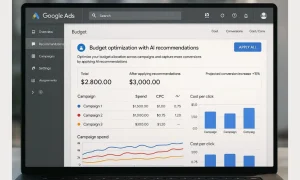
Even with strong bidding strategies, poor budget allocation can sink performance. Manual splits by campaign or ad group often leave money stranded in underperforming campaigns, while high-return campaigns go underutilised. AI addresses this by continuously reallocating funds across your portfolio to maximise conversions or value in real-time. That’s the foundation of budget optimisation in Google Ads.
Automated budget allocation
Instead of assigning flat daily limits, AI monitors performance at the auction and campaign level, then redistributes spend toward entities generating the best ROI. A lead-gen brand might see spend tilt from broad search to remarketing once conversion rates spike. For e-commerce, AI shifts budget toward categories with rising demand or higher-margin SKUs.
Seasonal adjustments
Holidays, paydays, sales, or events drive sudden traffic surges. AI detects these seasonal shifts and increases budget allocation during high-intent windows. For example, a travel advertiser sees a spike in spending ahead of long weekends, while retail campaigns push harder during Diwali or Black Friday.
Real-time budget shifts
AI systems factor in CPC inflation, competitor moves, and audience overlap. If a PMax campaign is achieving ROAS goals faster than generic search, funds are allocated seamlessly. If display remarketing becomes saturated, the budget flows back to prospecting. These micro-adjustments keep overall ROI stable.
Best practices
- Define performance thresholds (minimum ROAS/CPA levels).
- Use shared budgets only when campaigns share similar goals.
- Monitor pacing with AI alerts to catch anomalies (sudden CPC hikes, broken tracking).
- Layer rules for high-value segments (priority geos, profitable SKUs).
When executed with clean conversion tracking and clear margin rules, AI Google Ads strategies for budgeting remove guesswork, reduce waste, and ensure every rupee is chasing the highest-yield opportunity day by day, hour by hour.
Tracking Success: Using AI and GA4 for Better Attribution
Great optimisation starts with trustworthy data. If your events, values, or user IDs are misfiring, smart bidding and audience building will optimise to the wrong signals. Treat tracking as a product: version it, QA it, and monitor it continuously inside your Google Ad account.
Link GA4 & Google Ads the right way
- Enable Google Ads GA4 integration with auto-tagging and enhanced conversions.
- Map key events to conversions (lead_submit, add_to_cart, purchase) and pass values, currency, and customer identifiers where consented.
- Deduplicate online/offline events and verify using the GA4 DebugView and the Google Tag Assistant.
- Import conversions to Google Ads, selecting the attribution model that matches your goal (data-driven for most; time-decay when sales cycles are short).
Why this matters for attribution
- Data-driven attribution (DDA) in GA4 uses machine learning to assign credit across channels and touchpoints, replacing fragile last-click logic.
- Modelled conversions recover signal when cookies are limited, giving bidding strategies a fuller picture of true performance.
- Consent mode and enhanced conversions close gaps by modelling behaviour from aggregated, privacy-safe signals.
Audience insights that compound returns
- Build predictive audiences (likely purchasers and churn risk) from GA4 and sync them to relevant campaigns.
- Create high-intent remarketing lists based on event depth (e.g., product views exceeding 3, cart starts with a value exceeding ₹2,000).
- Utilise engaged-view-video conversions to enhance YouTube assistance.
- Segment LTV cohorts and weight them with value rules in Google Ads.
Operational checklist
- UTM governance: enforce consistent source/medium/campaign naming for clean path analysis.
- QA automation: alerts for conversion rate drops, missing values, and sudden traffic source shifts.
- Revenue integrity: Reconcile order totals with the backend daily, excluding test transactions.
- Incrementality: Run geo or audience split tests quarterly to validate the modelled lift.
When your pipes are clean, AI can finally see reality. With linked platforms, accurate events, and modelled conversions, attribution stabilises, budgets flow to the right journeys, and creative tests resolve faster turning reporting into a growth engine instead of a guessing game.
Common Mistakes to Avoid with AI in Google Ads
AI accelerates performance only when foundations are solid. The most common AI Google Ads mistakes begin with conversion tracking, including missing values, duplicate events, or counting micro-actions (such as page views and time-on-site) as conversions. That poisons learning and inflates results. Next, unclear goals such as running Maximise Conversions when profit matters or Targeting ROAS without accurate revenue push spend toward the wrong outcomes.
Overreliance on automation is another trap. Blindly accepting recommendations, broad geos, or unlimited placements invites waste. Keep guardrails: exclude low-margin products, cap risky geos/devices, and control brand vs non-brand budgets. Creative neglect is costly, too. RSAs need diverse, specific assets; stale copy stalls models and hides message-market fit. Refresh headlines, test value propositions, and prune underperforming holdings every month.
Poor negative-keyword hygiene and a disorganised account structure can lead to errors in Google Ads campaigns. Without query filtering, AI explores irrelevant traffic; with overlapping campaigns, signals fragment and learning resets. Consolidate where intents match, separate when economics differ, and maintain a clean negatives framework.
Finally, ignoring pacing and diagnostics can lead to runaway spending or sudden drops in performance. Monitor impression share, bid limits, learning status, and conversion lag. Use alerts for CPC spikes, broken tags, and stock/price changes.
Fix-it-fast checklist: Validate events and values, align bid strategy with business goals, set exclusions and value rules, maintain RSA hygiene, enforce negative and naming conventions, and review diagnostics weekly.
Conclusion & Next Steps
AI has reshaped acquisition, but the winners still pair human strategy with machine speed. A disciplined Google Ads Manager setup with clean conversion tracking, clear goals, and tight guardrails lets automation do what it does best: evaluate signals per auction, route budgets to high-value segments, and stabilise CPA/ROAS as markets shift. If you advertise on Google, start with outcome-first bidding (target CPA/ROAS or max conversions), keep your account structure intent-driven, and feed models with enhanced conversions, offline imports, and rich creative assets.
Your immediate next steps are to audit tracking and attribution (GA4 linking and event/value integrity), align bidding with margins, and set exclusion rules for low-yield traffic. Then, layer controlled experiments new audience signals, RSA asset mixes, and value rules review diagnostics weekly. As learnings compound, expand with Performance Max and tighten negatives to protect efficiency.
For a deeper implementation, run a 30-day audit that includes pacing and budgets, query hygiene, creative testing cadence, and LTV-weighted bidding. With this foundation, your Google Ads account becomes a self-optimising growth engine lowering wasted spend, increasing conversion rates, and unlocking scalable, predictable revenue.


