Fix Largest Contentful Paint (LCP) first. LCP measures how quickly your main content loads, and it is the metric most affected by common small business site issues: uncompressed images, slow hosting and render-blocking scripts. Once LCP passes Google’s 2.5-second threshold, move to Cumulative Layout Shift, then Interaction to Next Paint.
This guide covers the exact fix order that works for most small business websites on shared hosting in India. No developer needed for the first three steps. If you want a professional team to handle it, see our SEO company in Bangalore overview.
What Are Core Web Vitals?
Core Web Vitals are three speed and usability metrics that Google uses as ranking signals. Google introduced them in 2021 and updated the set in March 2024 by replacing First Input Delay (FID) with Interaction to Next Paint (INP).
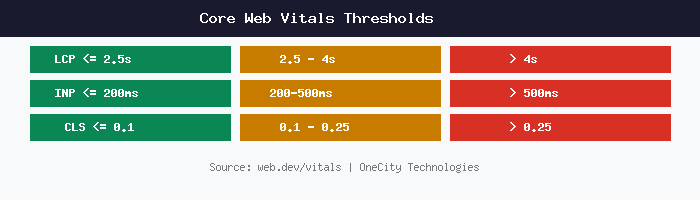
The three metrics and their thresholds:
| Metric | What it measures | Good | Needs work | Poor |
|---|---|---|---|---|
| LCP | How fast main content loads | ≤ 2.5s | 2.5 – 4s | > 4s |
| INP | How fast the site responds to clicks | ≤ 200ms | 200 – 500ms | > 500ms |
| CLS | How much the layout shifts while loading | ≤ 0.1 | 0.1 – 0.25 | > 0.25 |
Google measures these from real Chrome users visiting your site. The data appears in Google Search Console under the Core Web Vitals report. If your site does not get enough traffic for real-user data, Google uses its own lab tests of your pages instead.
Why Fix LCP First
LCP is the most impactful metric for small business websites for three reasons.
First, visitors notice it. A page that takes 4 seconds to show its main content loses visitors. Google’s own data shows that bounce probability increases 32% as page load time goes from 1 to 3 seconds (source: web.dev, Web Vitals documentation).
Second, LCP is the easiest metric to improve on most small business sites. The most common causes, large images and slow server response, have straightforward fixes.
Third, improving LCP often fixes CLS as a side effect. When images load faster and have explicit dimensions, layout shifts decrease.
How to Fix LCP on a Small Business Site
These are the most common LCP problems we find on business websites in Bangalore, listed in order of how often they appear.
1. Compress and Resize Images
This is the single most common cause of slow LCP. We regularly find 2 to 5 MB hero images on small business sites during our digital marketing audits in Bangalore. A 2 MB JPEG takes about 4 seconds to load on a typical Indian 4G connection.
What to do:
- Resize images to the maximum display size. If your hero image displays at 1200 pixels wide, do not upload a 4000-pixel original.
- Convert images to WebP format. WebP files are 25% to 35% smaller than JPEG at the same visual quality. Google’s Squoosh tool handles conversion for free.
- Set explicit width and height attributes on every img tag. This tells the browser how much space to reserve before the image downloads, which also prevents layout shifts (helping CLS).
2. Enable Server-Side Caching
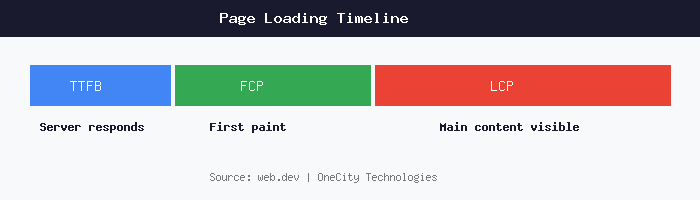
Time to First Byte (TTFB) is how long your server takes to start sending the page. If TTFB exceeds 800 milliseconds, LCP cannot pass because the browser has not even received the HTML yet.
On shared hosting (A2 Hosting, Bluehost, HostGator, GoDaddy), common causes include WordPress installations with 30+ active plugins, no server-side caching, and shared resources with hundreds of other sites.
Fixes:
- Install a caching plugin. WP Super Cache or LiteSpeed Cache (if your host supports LiteSpeed) serve a static HTML copy instead of running PHP on every request.
- Remove plugins you do not actively use. Every active plugin adds database queries and load time.
- If TTFB stays above 600 ms after caching, consider upgrading to a VPS or managed WordPress hosting. A2 Hosting Turbo plans and Cloudways both perform well for Indian sites.
3. Remove Render-Blocking CSS and JavaScript
When CSS and JS files load in the <head> of your HTML without async or defer attributes, the browser pauses rendering until those files download and execute. Sites with 8 to 12 external CSS and JS files (common with WordPress themes and plugins) can add 2 to 3 seconds to LCP.
Fixes:
- Add the
deferattribute to non-critical JavaScript files. - Inline the CSS needed for above-the-fold content directly in the HTML <head>.
- Move non-critical CSS loading below the fold or to the footer.
- Use a plugin like Autoptimize (WordPress) to combine and defer JS files.
4. Preload Your LCP Image
If your LCP element is a hero image, tell the browser to start downloading it immediately:
<link rel="preload" as="image" href="/images/hero.webp">
Without this hint, the browser discovers the image only after it parses the HTML and CSS, adding 500 ms to 1 second of delay.
How to Fix INP (Interaction to Next Paint)
INP replaced FID in March 2024. It measures the delay between a user action (click, tap, keypress) and the next visual update on screen. Google’s threshold: under 200 milliseconds is good.
INP problems are less common on small business sites than on e-commerce or SaaS sites with complex JavaScript. However, these issues do appear:
Heavy JavaScript from Plugins and Widgets
WordPress sites with live chat widgets, pop-up plugins, analytics scripts and social media embeds can load 1 MB or more of JavaScript. Each script competes for the browser’s main thread, making clicks feel sluggish.
Fix: open Chrome DevTools (press F12), go to the Performance tab, and record a page load. Look for long tasks, shown as yellow blocks longer than 50 ms. Remove or defer scripts that cause long tasks. Common offenders: Facebook Pixel loaded on every page, multiple analytics scripts, and pop-up plugins that initialise on page load instead of on specific pages.
Third-Party Chat and Ad Scripts
Chat widgets (Tawk.to, Zendesk, Intercom) and advertising scripts often block the main thread. A simple improvement: load the chat widget only when the visitor clicks “Chat with us” instead of on every page load. This keeps INP low on pages where no one interacts with the chat.
How to Fix CLS (Cumulative Layout Shift)
CLS measures visual stability. A score above 0.1 means your page layout jumps around while loading. Visitors find this frustrating, and Google counts it against your rankings.
Set Image and Video Dimensions
The most common cause of CLS: images and videos without width and height attributes. When the browser downloads an image and finds it is 400 pixels tall, it pushes all content below that image down by 400 pixels. That push is a layout shift.
Fix: add width and height to every <img> and <video> tag, or use the CSS aspect-ratio property. WordPress 5.5 and later versions automatically add dimensions to images uploaded through the media library, but manually inserted images and older uploads may not have them.
Reserve Space for Ads and Embeds
If your site shows Google AdSense or other advertisements, the ad container should have a minimum height set in CSS before the ad loads. Without reserved space, the ad pushes content down when it appears.
Avoid Inserting Content Above the Fold After Load
Cookie consent banners, newsletter pop-ups and notification bars that push page content down cause CLS. Use overlay-style banners that float on top of content instead of pushing it down.
How to Check Your Core Web Vitals for Free
Five tools, all free:
- Google Search Console. Go to the Core Web Vitals report under Experience. Shows real-user data grouped into Good, Needs Improvement and Poor URLs.
- PageSpeed Insights (pagespeed.web.dev). Enter any URL. Shows both field (real-user) data and lab (simulated) data with specific recommendations.
- Chrome DevTools Lighthouse. Open DevTools (F12), go to the Lighthouse tab, run an audit. Gives LCP, CLS and other scores with line-by-line recommendations.
- Web Vitals Chrome Extension. Shows LCP, INP and CLS in real time as you browse your site. Useful for catching CLS issues on specific interactions.
- CrUX Dashboard. A Looker Studio template that shows your CWV trends over time, broken down by device type and connection speed.
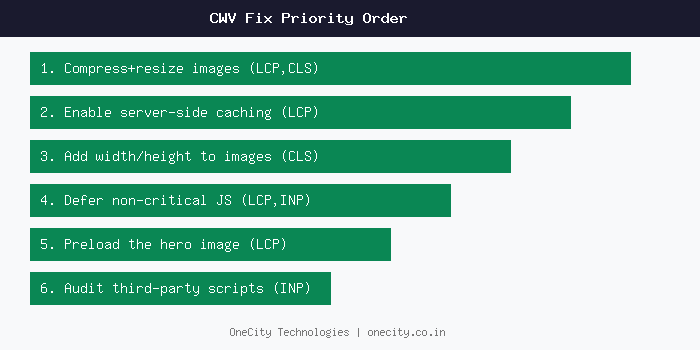
The Complete Fix Priority Order
For a typical small business site in Bangalore on shared hosting:
- Compress and resize images (fixes LCP, often fixes CLS too)
- Enable server-side caching (fixes LCP / TTFB)
- Add width and height to all images (fixes CLS)
- Defer non-critical JavaScript (fixes LCP, can improve INP)
- Preload the hero image (fixes LCP)
- Audit third-party scripts (fixes INP)
If you need help with any of these fixes, OneCity’s technical SEO team in Bangalore handles Core Web Vitals optimisation as part of every engagement. For a full site health check, see our SEO audit services.
Frequently Asked Questions
Do Core Web Vitals directly affect Google rankings?
Yes. Google confirmed Core Web Vitals as a ranking signal in 2021. The effect is a tiebreaker: when two pages have similar content quality and authority, the one with better CWV scores ranks higher. For competitive keywords in Bangalore, that tiebreaker matters.
My PageSpeed score is 40. Is my site penalised?
A low PageSpeed score does not mean a penalty. PageSpeed Insights shows a performance score from 0 to 100, but Google’s ranking signal uses the three CWV metrics individually, not the overall number. Focus on passing each metric (LCP under 2.5 seconds, INP under 200 milliseconds, CLS under 0.1) rather than chasing a perfect score.
How long after fixing CWV does Google notice?
Google’s Chrome User Experience Report (CrUX) data updates on a rolling 28-day window. After you deploy fixes, allow 28 days for the new scores to replace the old ones. You can verify your fixes immediately using PageSpeed Insights lab data, but the Search Console report and any ranking effect follow the 28-day cycle.
Can a shared hosting plan pass Core Web Vitals?
Yes, if the site is optimised. A static HTML site or a well-cached WordPress site on A2 Hosting’s shared plan can pass all three metrics. Sites with heavy plugins, uncached dynamic pages or large databases may need a VPS or managed hosting to pass LCP consistently. Read our small business SEO checklist for more hosting guidance.
Does Google measure CWV on mobile or desktop?
Google uses mobile-first indexing, so mobile CWV scores are the primary ranking signal. This is especially relevant for local SEO in Bangalore where most searches happen on mobile. The Search Console CWV report separates mobile and desktop. Fix mobile first because that is what Google uses for ranking. If your small business website passes on mobile, desktop will usually pass too.
L.K. Monu Borkala
Founder, OneCity Technologies. 20 years in search engine optimisation, Bangalore.
LinkedIn