Written by L.K. Monu Borkala, Founder, OneCity Technologies (CIN: U72100KA2009PTC048911), Bangalore. 20 years in business. +91 99023 30233. Google My Business, now called Google Business Profile, is still the fastest visibility win for a local business.

Reference sources: Startup India portal | DPIIT industry data.
What Google Business Profile Does for Bangalore Small Businesses That a Website Cannot
A Google Business Profile optimization appears in search results before your website does for most local searches. When someone in Bengaluru searches “accountant near me,” the first results they see are the map pack , three business listings with ratings, hours, phone numbers, and distances. The organic website results appear below the map. A small business without a GBP is invisible to this searcher, regardless of how good the website is.
This is the fundamental case for GBP: it gives small businesses direct visibility in the search result, without the visitor needing to click through to the website. A customer can see your phone number, call you, and book an appointment without your website being involved in the process at all. For Bangalore service businesses , plumbers, electricians, dentists, lawyers, tutors , where the primary conversion is a phone call, GBP visibility often drives more business than the website itself.
The GBP Features Bangalore Businesses Underuse
The Q&A section allows potential customers to ask questions about your business, and allows you to answer them. Most Bangalore businesses leave this section unmanaged , questions go unanswered, or worse, incorrect answers from the public sit there unaddressed. Proactively adding your own questions and answers , covering your most common customer queries , turns this section into a conversion tool rather than a liability.
GBP Posts allow you to publish updates, offers, events, and announcements that appear directly in your search listing. A Bangalore restaurant that posts its weekly specials, a dental clinic that posts about teeth cleaning camp pricing, or a coaching centre that posts about upcoming batch dates is giving potential customers a reason to choose them over a competitor with a static listing. GBP Posts disappear after seven days for standard posts, which means weekly posting is the cadence required to maintain continuous visibility.
The Messaging feature allows customers to send direct messages to your business from the Google search results page. Many Bangalore businesses have this feature enabled but do not monitor it. An unanswered message from a potential customer is a lost enquiry. Set up automatic reply messages and a notification process for incoming messages before enabling this feature. OneCity Technologies manages GBP profiles for Bangalore small businesses as part of local SEO campaigns. L.K. Monu Borkala, Founder, OneCity Technologies Pvt Ltd (CIN: U72100KA2009PTC048911). +91 99023 30233 | sales@onecity.co.in.
How to Measure Whether Your Google Business Profile Is Working
Google Business Profile provides built-in insights that show you how many times your listing appeared in search results, how many people clicked for directions, how many called directly from the listing, and how many visited your website from the profile. These metrics, reviewed monthly, tell you whether your GBP is actively driving business or sitting dormant.
The most important metric for Bangalore local businesses is phone calls from the GBP listing. For service businesses , plumbers, electricians, tutors, clinics , a significant portion of revenue enquiries come through this channel. If your GBP is generating impressions but few calls, the problem is usually one of three things: the primary category is wrong, the review rating is below the local competitors showing ahead of you, or the listing is missing key service information that searchers need to make a contact decision.
Compare your GBP metrics to your Search Console data monthly. If GBP impressions are high but website traffic from GBP is low, your website URL in the GBP may be incorrect, or the website linked from GBP loads slowly enough that visitors abandon before it renders. Both are fixable technical issues with measurable impact on enquiry volume. OneCity Technologies Pvt Ltd (CIN: U72100KA2009PTC048911). Free GBP audit for Bangalore small businesses. +91 99023 30233 | sales@onecity.co.in.
The Answer to the Title Question
Does Google My Business really help small businesses grow faster? Yes , specifically for businesses where the customer’s decision journey starts with a local search and ends with a call or a visit. For Bangalore service businesses, retail shops, restaurants, clinics, and professional services in competitive neighbourhoods, a well-managed GBP is the single highest-ROI digital marketing investment available. It costs nothing except time to maintain, it appears ahead of organic website results for local searches, and it puts your phone number in front of a customer who is already looking for exactly what you offer. The question is not whether it helps. The question is why every Bangalore small business is not managing it consistently. OneCity Technologies Pvt Ltd (CIN: U72100KA2009PTC048911). Free GBP audit: +91 99023 30233 | sales@onecity.co.in.
Google Business Profile , now Google Business Profile , is the most direct path between a Bangalore consumer’s search and your phone ringing. It requires no ad spend, it appears above organic website results for local searches, and it is completely within your control to manage. A well-maintained GBP for a Bangalore small business is the single highest-ROI digital marketing asset available. The investment is time. The return is qualified local enquiries. OneCity Technologies Pvt Ltd (CIN: U72100KA2009PTC048911). Free GBP audit: +91 99023 30233 | sales@onecity.co.in.
Google Business Profile is free, powerful, and consistently underused by Bangalore small businesses. That underuse is your competitive opportunity. OneCity Technologies Pvt Ltd (CIN: U72100KA2009PTC048911). +91 99023 30233 | sales@onecity.co.in.
Google My Business, now called Google Business Profile, is often the first place customers discover a local brand. For small businesses, a strong web presence is no longer optional; it directly impacts calls, walk-ins, and sales. A well-optimised profile can boost visibility in local SEO, build customer trust through reviews, and highlight your products, services, and updates in real-time. In this guide, we’ll break down how your GBP listing works, its core benefits, key features, and simple optimisation steps that help small businesses grow faster in competitive local markets. You’ll also learn when GMB works best and its limits.
What Is Google Business Profile & Why Does It Matter?
Google My Business, now known as Google Business Profile, is a free listing tool from Google. It allows you to control how your business appears in Search and Maps, including your name, address, website, and reviews. When done right, GMB optimisation becomes one of the most powerful marketing solutions for small companies.
Understanding Google My Business/Google Business Profile
Your profile works like a live digital storefront. You can display services, products, photos, opening hours, FAQs, and updates, so customers receive accurate information before contacting you.
How GMB Connects Local Customers to Your Business
When people nearby search for services using the phrase “near me,” Google uses local SEO ranking factors, including relevance, distance, and prominence, to determine which profiles appear. A complete and active listing gives you a better chance to stand out.
Importance of Showing Up in Local Search & Google Maps
Appearing in the Local 3-Pack and Maps means increased visibility, more calls, and additional visits. If you have missing or incomplete information on GMB, you give that opportunity away to your competitors.
Key Benefits of Google Business Profile for Small Business Growth
 Google My Business is more than a listing; it can power your business marketing. A strong Google Business Profile enhances discovery, builds trust, and converts nearby searches into real customers.
1. Boosts Local SEO Rankings
Smart gmb optimisation helps your brand appear in the Local 3-Pack and Maps. Accurate details, clear photos, and regular updates enhance local SEO ranking factors, increasing your profile’s visibility and surpassing that of many nearby competitors.
2. Increases Customer Trust With Reviews & Ratings
Customers check ratings before choosing a local service. Genuine reviews, real photos, and professional replies create social proof, reduce doubt, and make people more confident about calling or visiting your business.
3. More Calls, Visits & Direct Leads
Your profile turns searches into actions. With one tap, people can call, request directions, visit your website, or send a message. Google Insights also shows the number of calls and visits that come through your listing.
4. Free and Cost-Effective Marketing Tool
Unlike many paid ads, Google Business Profile is free to use. With regular updates, posts, and photos, it becomes a cost-effective, always-on marketing asset that consistently attracts local leads, even with a small budget.
How Google My Business Helps Attract More Local Customers
Google My Business helps you connect with people at the exact moment they search for nearby businesses. Instead of cold outreach, your Google Business Profile becomes a lead engine, converting local intent into enquiries and foot traffic.
Showing Up When Customers Are Ready to Purchase
When someone searches “best salon near me” or “plumber in Bangalore,” Google checks location, relevance, and other local seo ranking factors. A well-structured, verified profile with reviews, photos, and clear categories makes it easier for ready-to-buy customers to choose you over similar options.
Engaging Customers Through Posts, Photos & Offers
You can publish timely posts, highlight deals, upload fresh photos, and showcase events. These small GMB optimisation actions keep your listing active and persuasive, reminding repeat customers to come back and nudging new visitors to try your service.
Business Insights for Better Decision-Making
Google Business Profile insights show which search queries people use, how many tap to call, ask for directions, or visit your website. Studying this behaviour helps you refine offers, adjust timings, and plan better local business marketing solutions that match local customer demand.
Essential Google Business Profile Features Every SMB Should Use
Google My Business offers tools that can turn your Google Business profile into a steady local lead source. Focusing on a few core features makes GMB optimisation practical and effective for small business owners.
Posts & Promotional Updates
Use Posts to share offers, new launches, events, and announcements in Search and Maps. Regular posting keeps your profile active and gives customers a reason to contact you now.
Messaging & Customer Q&A
Enable messaging so people can ask questions without having to call. Monitor and answer Q&A to clear doubts about pricing, services, or location before customers visit.
Photos, Videos, and Virtual Tours
Good photos, short videos, and 360° views show your ambience, team, and work quality. Visual proof builds trust quickly, especially for salons, clinics, cafés, and showrooms.
Service & Product Listings
Add services and product categories with prices or starting rates. This helps Google match you to more specific searches and sets clear expectations.
Appointment/Booking Integrations
If you take bookings, connect to supported scheduling tools. One-tap booking from your listing reduces friction and brings more confirmed appointments from local searchers.
How to Optimise Your Google My Business Profile for Best Results
 A well-optimised Google Business Profile profile sends clear signals to Google and to customers. Use this checklist to change your Google Business Profile into a local lead generator that supports local business marketing solutions.
Complete All Business Information Accurately (NAP Consistency)
Fill in your business name, address, phone number, website, categories, and service areas. Make sure that NAP details match your website and the leading directories. Consistency builds trust and supports key local SEO ranking factors.
Add Keyword-Optimised Descriptions & Categories
Write a short description that explains who you serve, what you offer, and where you operate. Naturally include phrases people search for, including your city and services. Select primary and secondary categories that align with your business.
Regularly Publish Posts, Photos & Offers
Post weekly updates with promos, tips, or new launches. Add fresh photos of your work, team, and space. Regular activity shows Google that your listing is live and gives customers reasons to contact you.
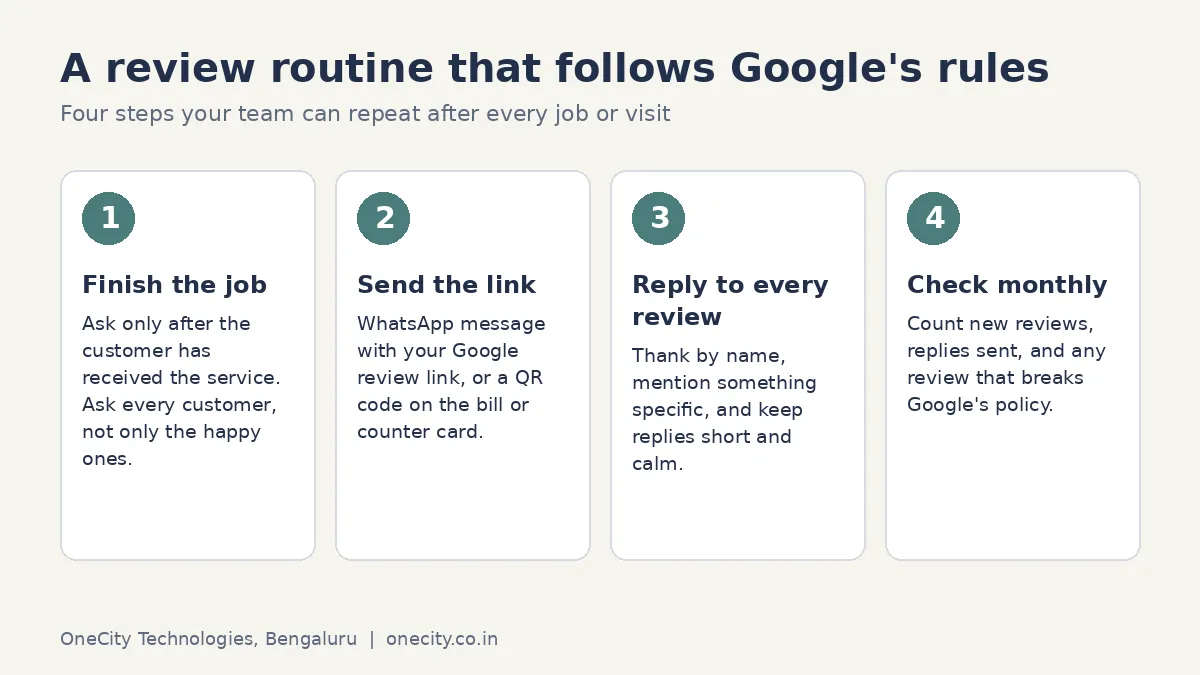
Encourage & Respond to Customer Reviews
Ask satisfied customers to leave honest reviews and ratings. Reply to every review,positive or negative,with a polite, helpful tone. This strengthens credibility, improves click-through rates, and boosts overall Google My Business optimisation. Also Read: Learn how to create a your GBP listing account to grow your local presence
Keep Operating Hours Updated (Especially Special Hours)
Set correct opening and closing times, including holidays or special events. Update hours whenever they change so customers don’t face surprises. Accurate timing reduces frustration and helps Google suggest your business at the right moments.
Real-World Success Examples of Businesses Using GMB
Many small businesses grow faster by treating their Google Business Profile as a daily marketing tool, not a one-time setup.
Restaurant / Local Cafe Growth Story
A small cafe in a busy neighbourhood updated photos weekly, replied to every review, and posted lunch offers before peak hours. Within three months, calls from Google Maps doubled and weekend walk-ins increased because locals trusted its rating and recent photos.
Local Service Provider (Salon/Plumber/Clinic)
A local salon added service lists, pricing, and “Book Now” links with simple before–and–after photos. People searching “salon near me” began booking directly from the profile, reducing reliance on discount apps and generating more repeat customers.
Common Mistakes Businesses Make on Google Business Profile
Many small businesses create a google business profile and then forget about it. This hurts visibility and confuses customers. Avoid these common GMB optimisation mistakes to achieve consistent leads.
1. Unverified or Partially Filled Profiles
Leaving the profile unverified, missing categories, or skipping service details makes your listing weak and less likely to rank.
2. Not Updating Business Info Regularly
Old phone numbers, wrong addresses, or outdated hours frustrate users. Inaccurate details also send poor signals to local SEO ranking factors.
3. Ignoring Reviews & Customer Messages
Not replying to reviews or messages makes your business look inactive. Slow or no response reduces trust and can prompt customers to switch to competitors.
Does Google My Business Guarantee Faster Business Growth?
Google My Business can accelerate growth, but it is not a magic switch. Results depend on how well you set up, optimise, and maintain your Google Business Profile.
Depends on Optimisation and Competition Level
If your listing is half-filled while competitors actively manage theirs, you will not see strong results. Consistent GMB optimisation, review management, and accurate data are essential, especially in crowded locations or competitive industries.
Works Best with Website + SEO + Social Media
Treat Google Business Profile as one pillar of your marketing. When your website, local SEO, content, and social channels support the same message, your listing converts more searches into loyal customers over time.
GBP Versus Paid Speed, a Real Optimisation Checklist, and Recovering From Suspension
Comparing Google Business Profile growth speed against paid advertising speed helps set realistic expectations for a small business choosing where to focus first. Paid ads can produce enquiries within days of launching, at a cost that scales directly with spend. Google Business Profile optimisation takes weeks to show meaningful movement in Maps pack visibility, but produces enquiries at effectively zero marginal cost once established, and continues working without ongoing ad spend. The realistic answer for most small businesses is running both together: paid ads for immediate volume while GBP optimisation compounds toward a lower long-term cost per enquiry.
A genuinely useful GBP optimisation checklist covers more than the basics most businesses already know. Beyond claiming and verifying the listing, complete category selection using both primary and secondary categories, a full set of current photos updated seasonally, weekly posts using the Updates feature, and prompt responses to every question in the Q&A section all contribute measurably to how Google Business Profile ranks the listing in local search results.
Multi-location businesses face GBP management challenges a single-location business never encounters: keeping category and service selections consistent across locations while allowing genuine local differences, managing review responses across multiple listings without responses starting to sound identical and automated, and preventing duplicate listings from being accidentally created when a location moves or rebrands, which actively damages every listing involved once it happens.
Recovering from a Google Business Profile suspension is possible but requires patience and precision. The appeal process needs specific documentation proving the business is legitimate and located where claimed: utility bills, business registration documents, and photos of the physical location all help. Reapplying with the same information that triggered the original suspension without addressing the underlying issue, commonly an address or name inconsistency, typically results in a repeated suspension rather than a successful appeal.
Frequently Asked Questions
Does Google My Business really bring customers, or just views?
Customers, when the profile is complete. Calls, direction requests, and website taps from the profile are actions, not impressions, and Insights shows each one so nothing is taken on faith.
Is Google My Business free?
Completely. The listing, posts, reviews, messaging, and insights cost nothing. What costs is the discipline of maintaining photos, hours, and review replies.
Why is my competitor above me in the Maps pack?
Some mix of proximity to the searcher, review count and recency, category accuracy, and profile completeness. Proximity you cannot change; everything else you can.
How many reviews does a Bangalore business need?
More than the businesses around you in your category, arriving steadily. A burst of twenty reviews in a week looks worse to Google than two a week for ten weeks.
What gets Google Business Profiles suspended?
Name stuffing with keywords, virtual addresses presented as real offices, and sudden identity changes. Use the real business name and real address, and suspensions become rare.
Conclusion
your GBP listing remains one of the simplest ways for small businesses to appear where customers are already searching. A complete and active Google Business Profile enhances local SEO visibility, builds trust through honest reviews, and converts “near me” searches into calls, visits, and bookings. With consistent GMB optimisation accurate data, photos, posts, and review management your profile becomes a long-term local business marketing solution, not just a basic listing. While it doesn’t replace a good website and branding, every serious local business should treat GMB as a core growth channel and keep refining it over time. Looking to grow your business visibility online? Get professional Google My Business optimisation with OneCity! Visit: onecity.co.in

L.K. Monu Borkala
Founder & SEO Director, OneCity Technologies
20 years running SEO campaigns from Bangalore. Full author profile · LinkedIn