To build a mobile app in India, define one problem, validate demand, scope a first version, pick a framework, design in Figma, build in two-week sprints, test on real phones, meet the store rules and launch in stages. A business app takes 10 to 14 weeks and costs Rs 1,00,000 to Rs 2,50,000 with a Bangalore agency.
This guide gives the ten steps in order, with a checklist for each, the Indian details most guides skip, and the Google Play and App Store rules that apply in October 2026. It draws on apps our team has built and priced at OneCity Technologies.
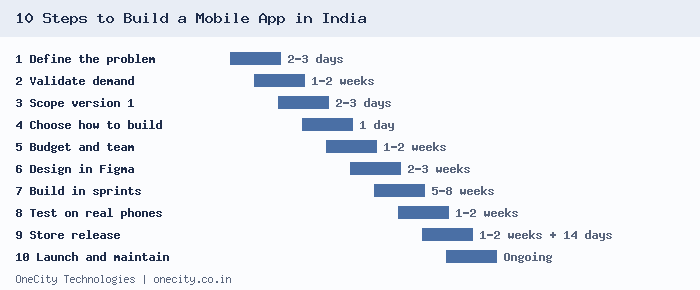
The 10 Steps at a Glance
| Step | What happens | Typical time | You end with |
|---|---|---|---|
| 1 | Define the problem and the user | 2 to 3 days | One-sentence app statement |
| 2 | Validate demand | 1 to 2 weeks | Evidence people want it |
| 3 | Scope version 1 | 2 to 3 days | Feature and screen list |
| 4 | Choose how to build | 1 day | Framework decision |
| 5 | Set budget and pick a team | 1 to 2 weeks | Signed scope and quote |
| 6 | Design in Figma | 2 to 3 weeks | Approved screens |
| 7 | Build backend and app | 5 to 8 weeks | Test builds every two weeks |
| 8 | Test on real devices | 1 to 2 weeks | Signed-off acceptance list |
| 9 | Prepare the store release | 1 to 2 weeks, plus 14 days if needed | Accounts, listing, signed builds |
| 10 | Launch, measure, maintain | Ongoing | Live app and a fix schedule |
Step 1: Define the One Problem Your App Solves
Start with one sentence: “For [type of user] who [has this problem], our app [does this].” If the sentence needs the word “and” twice, the app is trying to do too much for a first release.
- Name the main user and two secondary users, for example patient, receptionist, doctor.
- Decide the languages. Most Indian users read English and one regional language, so plan Kannada, Hindi or Tamil from the start.
- Note which phones your users hold. Most Indian smartphone users are on Android, and many carry budget models with limited memory.
Step 2: Check That People Want It Before You Build
The cheapest mistake to fix is the one you find before design starts. Talk to ten to twenty people who match your user and ask how they solve the problem today. Then test interest with something small: a landing page with a sign-up form, or a WhatsApp group where you run the service by hand.
- Search the Play Store for your idea and read the one-star reviews of the top three apps. Those reviews list the gaps you can fill.
- Check search demand with Google Keyword Planner, which is free with an Ads account.
- Set a pass mark before you start, for example 50 sign-ups from a page that costs Rs 5,000 in ads. Our PPC team runs such tests for clients.
Step 3: Scope Version 1
List every feature you can think of, then sort each into must have, should have or later. Version 1 holds the must-haves only. Five to seven features is a healthy first release.
| Feature (clinic appointment app) | Version 1? | Reason |
|---|---|---|
| Patient login with phone number | Must have | Nothing else works without it |
| Book and cancel a slot | Must have | The core job |
| Reminder notification | Must have | Cuts missed appointments |
| Front-desk admin panel | Must have | Staff need to see bookings |
| Online payment | Should have | Can start as pay at clinic |
| Prescription upload | Later | Adds health data duties |
Count the screens that result, including empty and error states. That count feeds the cost estimate in step 5.
Step 4: Choose How to Build It
| Approach | Best for | Trade-off |
|---|---|---|
| Flutter | Business apps for Android and iOS | One codebase for both stores. Unusual hardware features need a test first. |
| React Native | Teams that already write JavaScript | One codebase too. The choice often comes down to who you can hire. |
| Native (Kotlin and Swift) | Heavy hardware use | Two codebases, two builds, higher cost. |
| PWA | Content and simple tools | No store approval, but fewer device features. |
For most business apps we recommend Flutter. Our Flutter development page shows the process, the cost tiers and the apps we have built with it.
Step 5: Set a Budget and Pick Your Team
Use your screen count and backend needs to find your tier. These are our current Flutter prices for Android and iOS together.
| App type | Timeline | Cost |
|---|---|---|
| Informational | 5 to 7 weeks | Rs 50,000 to Rs 80,000 |
| Business app with login and backend | 10 to 14 weeks | Rs 1,00,000 to Rs 2,50,000 |
| E-commerce | 14 to 18 weeks | Rs 2,00,000 to Rs 5,00,000 |
| On-demand or delivery | 18 to 26 weeks | Rs 4,00,000 to Rs 8,00,000 |
| SaaS or enterprise | 24 to 36 weeks | Rs 6,00,000 to Rs 15,00,000+ |
Our mobile app cost guide has a six-step method for estimating your own number and the seven questions to ask before you sign with any developer. Ask for a discovery phase first. It turns your idea into a written scope and a fixed quote.
Step 6: Design in Figma and Approve Every Screen
Design happens in two passes. Wireframes come first and show layout and flow without colour. Then full-colour screens in your brand style. Changing a screen in Figma takes minutes. Changing it after the code is written takes days.
- Test every screen with your longest regional-language label, because Kannada and Hindi text often runs longer than English.
- Design the empty, loading, error and offline states, not only the happy path.
- Keep tap targets large and text readable on small, low-resolution screens.
- Compress images so screens load on slow mobile data.
Step 7: Build the Backend and the App in Sprints
The backend holds your data, user accounts and payments, and gives staff an admin panel. The app talks to it through an API. Work in two-week sprints and ask for an installable test build at the end of each one: an APK for Android and a TestFlight invitation for iPhone.
These integrations come up in most Indian apps:
| Need | Common choice | What to know |
|---|---|---|
| UPI and card payments | Razorpay | Its standard plan lists 2% plus GST and no setup or annual fee. Confirm current rates before you budget. |
| Maps and location | Google Maps | Free monthly calls per service replaced the old USD 200 credit on 1 March 2025. |
| Login by phone number | SMS one-time password | Indian senders register on the DLT platform before messages are delivered. |
| Alerts | Push notifications | Ask for permission at the moment it makes sense, not on first launch. |
Step 8: Test on Real Phones
An emulator cannot tell you how the app behaves on a three-year-old Android phone on a weak signal. Test on physical devices across price bands, including at least one low-end Android model and one iPhone.
| Test | What you are checking |
|---|---|
| Slow or no network | The app shows a clear message and keeps unsent work |
| Permission denied | Location, camera or notification refusal does not break the app |
| Interruptions | A phone call or a switch to another app does not lose data |
| Small screens and large fonts | Nothing is cut off or overlaps |
| Login and payment flows | Failed attempts, timeouts and repeat taps are handled |
| Android 16 and iOS 26 | The release builds you will actually submit |
Then run acceptance testing yourself against a checklist from your developer. Sign it off in writing so both sides agree the scope was delivered.
Step 9: Prepare the Store Release
Store rules changed in the last two years, and they decide your launch date. These apply in October 2026.
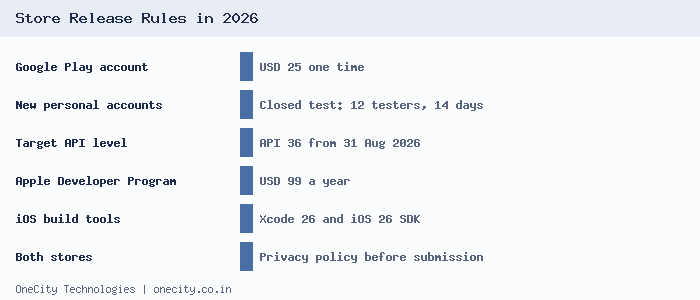
- Open the accounts in your business name. Google Play charges USD 25 once and the Apple Developer Program USD 99 a year. Your name on the account means you own the listing and reviews.
- Run the Google Play closed test. Personal accounts created after 13 November 2023 need at least 12 testers opted in for 14 continuous days before production access, per Google’s testing requirements. Start recruiting testers during step 8.
- Target Android 16. From 31 August 2026, new apps and updates must target API level 36, with an extension available to 1 November 2026, as listed in the Android target API requirements.
- Build iOS with Xcode 26. Since 28 April 2026, uploads need Xcode 26 or later with the iOS 26 SDK, per Apple’s upcoming requirements list.
- Prepare the listing. App name, icon, screenshots, short and long descriptions, and a privacy policy page. Complete Google’s Data safety form and Apple’s privacy details to match what the app collects.
- Add a data-deletion page. Users should be able to ask for their data to be removed. We built one for the MasjidGo listing.
In our experience, Android review takes 2 to 4 days. Allow longer for a first iOS submission.
Step 10: Launch in Stages, Measure and Maintain
Release to a small share of users first. Watch crash reports for a few days, then widen the rollout. A bug that reaches 5% of users is cheaper to fix than one that reaches everyone.
- Track three numbers: installs, sign-ups per install, and users who come back after day 1, day 7 and day 30.
- Answer every store review within a few days. Replies show prospective users that someone is listening.
- Plan an update every month or two. New Android and iOS versions arrive every year, and an unmaintained app starts to fail.
- Agree a maintenance contract. Ours start at Rs 5,000 per month.
Handling User Data Under India’s DPDP Rules
The Digital Personal Data Protection Rules, 2025 were notified on 13 November 2025. Published timelines put the main duties for businesses that collect personal data at 13 May 2027, so an app you start now will launch close to that date. Build for it from the first sprint:
- Show a plain-language consent notice before collecting names, phone numbers or location.
- Collect only what each feature needs.
- Provide a way for users to see, correct and delete their data.
- Write down who handles a data breach and how users will be told.
- Take extra care if children may use the app.
This is a build checklist and not legal advice. Have your own counsel confirm what applies to your business. For health data, see our healthcare software development work.
Example 12-Week Timeline for a Business App
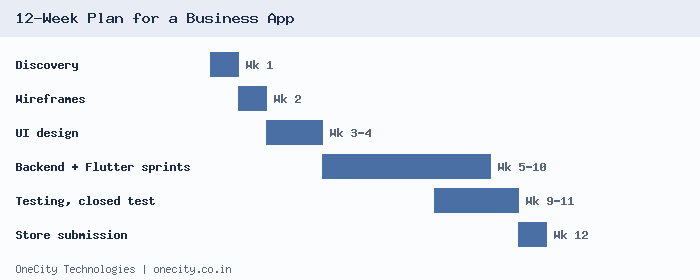
| Weeks | Work |
|---|---|
| 1 | Discovery, scope and quote |
| 2 | User flows and wireframes |
| 3 to 4 | UI design in Figma, backend set-up begins |
| 5 to 10 | Backend and Flutter sprints, one test build every two weeks |
| 9 to 11 | Device testing, fixes, Google Play closed test if needed |
| 12 | Store submission and staged release |
Five Mistakes That Delay or Sink Apps
- Skipping validation. Building first and asking later is the most expensive order.
- Putting everything in version 1. Every extra feature adds design, build and test time.
- Testing only on one new phone. Real users hold older and cheaper devices.
- Leaving the store rules to the last week. The Google Play closed test alone takes 14 days.
- Letting the developer own the accounts. Switching teams later becomes difficult when the listing sits in someone else’s name.
If you want a team to scope your idea, send us your requirements. We will review them against these ten steps and reply with questions for a discovery call. You can also see how other work fits together on our SEO and website development pages, since an app launch usually needs both.
Scoping a first version? See our MVP app development for startups.
Frequently Asked Questions
What are the steps to build a mobile app?
Define the problem, validate demand, scope version 1, choose a framework, set a budget and team, design in Figma, build in sprints, test on real devices, prepare the store release, then launch in stages and maintain. A business app moves through all ten steps in 10 to 14 weeks.
How much does it cost to build a mobile app in India?
An informational app costs Rs 50,000 to Rs 80,000. A business app with login and an admin panel costs Rs 1,00,000 to Rs 2,50,000. E-commerce apps run Rs 2,00,000 to Rs 5,00,000 and on-demand apps Rs 4,00,000 to Rs 8,00,000. Hosting, store fees and maintenance are extra.
How long does it take to build and publish an app?
A simple app takes 5 to 7 weeks and a business app 10 to 14 weeks, including store submission. A new personal Google Play account needs a closed test with 12 testers for 14 days before production, so start recruiting testers while the app is still in testing.
Can I build an app without knowing how to code?
You can test an idea without code by using a landing page, a spreadsheet and a WhatsApp group, or a no-code builder for a simple prototype. Apps with payments, a custom backend or several user roles usually need developers. Validate with the cheap version first.
Do I need Flutter or native development?
Most business apps for Android and iOS are well served by Flutter, because one codebase covers both stores. Choose native development when a feature needs deep hardware access, such as augmented reality or advanced camera work. A short prototype of that feature settles the question before you commit.
What do Google Play and the App Store require in 2026?
Google Play needs new apps and updates to target Android 16 (API 36) from 31 August 2026, with an extension to 1 November 2026. New personal accounts need a 14-day closed test with 12 testers. The App Store needs builds from Xcode 26 with the iOS 26 SDK.
Author: L.K. Monu Borkala