MVP App Development for Startups in Bangalore
OneCity Technologies builds first versions of apps, called MVPs, for startups in Bangalore. A version 1 with login, one core flow and an admin panel takes 10 to 14 weeks and costs ₹1,00,000 to ₹2,50,000. Two-sided and on-demand apps cost more. This page shows what goes into version 1, what waits, and how we run the build.
What an MVP Is, and What It Is Not
An MVP is the smallest app that lets real users finish the one task your idea depends on. You release it to learn what people do, then decide what to build next. It is not a clickable prototype, and it is not a full product with the features cut at random.
| Prototype | MVP | Full product | |
|---|---|---|---|
| What it is | Clickable screens, no real data | A working app in the stores with a backend | Every planned feature, several user roles |
| Who uses it | You and a few test users | Real users, often a small group | The public |
| Typical time with us | 2 to 3 weeks | 10 to 14 weeks | 18 to 36 weeks |
| Main question it answers | Does the flow make sense? | Will people use it and come back? | Can it grow and earn? |
What Goes Into Version 1 and What Waits
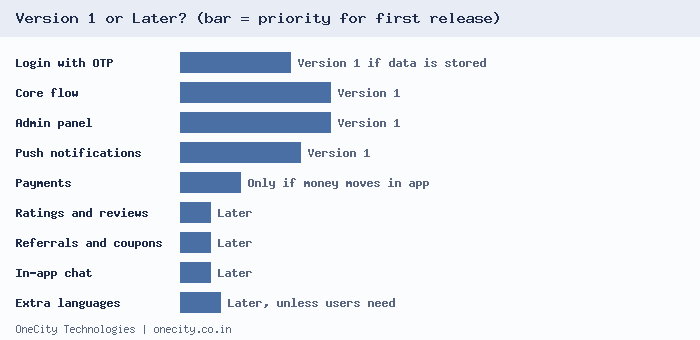
Most startup budgets break on features added before anyone has used the app. We sort every feature into version 1 or later with one test: does a user need it to finish the core task on day one?
| Feature | Version 1? | Reason |
|---|---|---|
| Sign-up with mobile number and one-time password | Yes, if the app stores user data | Needed for orders, bookings and saved data. Skip it if the app works without accounts. |
| The core flow: book, order, request or post | Yes | This is the reason the app exists. |
| Admin panel | Yes | Your team must manage users and orders from day one. Building this later costs more. |
| Push notifications | Yes | They bring users back. Keep to two or three useful messages. |
| Payments | Only if money moves inside the app | Otherwise take payment outside the app at first and add Razorpay later. |
| Ratings and reviews | Later | They need enough users to mean anything. |
| Referral rewards and coupons | Later | Add them once you know which users stay. |
| In-app chat | Later | A WhatsApp link covers the need at first. |
| Extra languages | Later, unless your users need them | If your first users read Kannada, put it in version 1. |
Our own Success Tie app shows the idea. Version 1 has no user accounts, and streaks are stored on the phone. The backend only serves lessons that a human scholar has approved. Leaving out accounts keeps version 1 small.
MVP Cost and Timeline for Startups
These ranges match our mobile app development page. Pick the row closest to your idea. All app rows cover Android and iOS built from one Flutter codebase.
| Type of first version | What it includes | Timeline | Cost |
|---|---|---|---|
| Progressive web app | Installable web app, no store approval | 4 to 8 weeks | ₹40,000 to ₹1,50,000 |
| Informational app | 5 to 8 screens, content, contact form, no backend | 5 to 7 weeks | ₹50,000 to ₹80,000 |
| Business app MVP | Login, backend, admin panel, push notifications | 10 to 14 weeks | ₹1,00,000 to ₹2,50,000 |
| E-commerce MVP | Catalogue, cart, Razorpay payments, orders, admin panel | 14 to 18 weeks | ₹2,00,000 to ₹5,00,000 |
| On-demand or two-sided MVP | Several apps and panels, maps, live tracking | 18 to 26 weeks | ₹4,00,000 to ₹8,00,000 |
How We Build an MVP
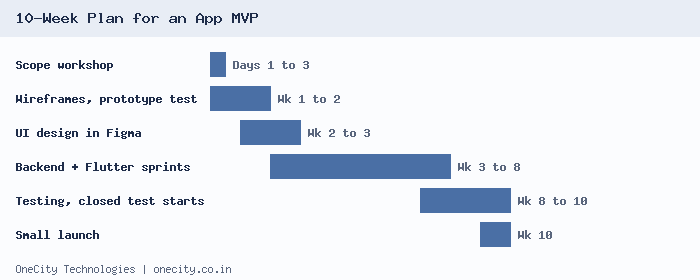
The durations below fit a business app MVP at the short end of the 10 to 14 week range. Each step ends with something you can open, test or approve.
Step 1. Scope workshop
We write one sentence that describes your user and the task, list every feature you want, and sort the list into version 1 and later. You leave with a feature list, a screen count, a timeline and a written quote.
Step 2. Wireframes and a prototype test
We build clickable wireframes. You put them in front of five people who match your user and watch where they hesitate. Changing a wireframe costs hours. Changing built code costs weeks.
Step 3. UI design in Figma
Full-colour screens in your brand colours. You approve every screen before any code is written.
Step 4. Backend, admin panel and Flutter build
We build in two-week sprints. After each sprint you get an installable test build: an APK for Android and a TestFlight invitation for iPhone. See our Flutter app development process for the full detail.
Step 5. Testing and the Google Play closed test
We test on real phones, including low-end Android devices and slow mobile data. New personal Google Play accounts must also run a 14-day closed test, so we start recruiting testers during step 4.
Step 6. Small launch and measurement
We release to a small group first, watch crash reports, and review three numbers with you: how many installs finish the core task, how many return in seven days, and how many pay or enquire.
Store and Data Rules to Plan For in 2026
- Google Play closed test. Personal accounts created after 13 November 2023 need 12 testers opted in for 14 continuous days before production access. Check Google's help page for your account type.
- Android 16 target. From 31 August 2026, new apps and updates must target API level 36, with an extension to 1 November 2026. See the Android target API requirements.
- Xcode 26 for iOS. Since 28 April 2026, App Store uploads need Xcode 26 or later. Apple lists dates on its upcoming requirements page.
- India's DPDP Rules. The Digital Personal Data Protection Rules, 2025 were notified on 13 November 2025. Published timelines put the main duties for businesses that collect personal data at 13 May 2027. We build a consent screen and a deletion path into version 1, so you do not rebuild later. This is not legal advice, so confirm what applies with your own counsel.
For the full release checklist, read our step-by-step guide to building a mobile app in India.
What We Need From You
- One sentence on who the app is for and the task it must do.
- Your must-have list, even if it is long. We help cut it.
- Two or three apps you like, and what you like about each.
- One person who can approve designs and builds within two days.
- Accounts in your company name for Google Play, Apple and your payment gateway.
Have an idea to scope? Send us your requirements or call 99023 30233 and we will reply with questions for a scope workshop. If you need a website to test demand first, see our website development services. Based in Mangalore? Our team there handles app development in Mangalore.
Frequently Asked Questions
How much does an MVP app cost in Bangalore?
A business app MVP with login, backend and admin panel costs ₹1,00,000 to ₹2,50,000 with us. A simple informational app costs ₹50,000 to ₹80,000, and an on-demand or two-sided app costs ₹4,00,000 to ₹8,00,000. Store fees, hosting and gateway charges are extra.
How long does it take to build an MVP?
A business app MVP takes 10 to 14 weeks, an informational app 5 to 7 weeks, and an on-demand app 18 to 26 weeks. Add 14 days if your Google Play account is a new personal account that needs the closed test with 12 testers.
What is the difference between a prototype and an MVP?
A prototype is a set of clickable screens with no real data, used to test whether the flow makes sense. An MVP is a working app with a backend that real users install and use. Build the prototype first, because changing a wireframe is far cheaper than changing code.
Should my MVP be an app or a website?
Choose an app when you need the camera, the phone's location, background tasks or a listing in the app stores. Choose a website or progressive web app when the task works well in a browser, because it avoids store approval and costs less to test. We advise on this in the scope workshop.
Can I add features to the MVP later?
Yes. We keep the backend and screens organised so version 2 builds on version 1 instead of replacing it. Features such as reviews, referrals and in-app chat are quoted separately once real usage shows which ones your users want. Maintenance contracts start at ₹5,000 per month.
Do you build for both Android and iPhone?
Yes. We build with Flutter, so one codebase produces both the Android and iPhone apps, and the prices above cover both. If your first users are all on Android, we can release on Google Play first and add the App Store release afterwards.
Who owns the app and the store accounts?
The Google Play and Apple accounts should be registered in your company name, so you own the listing, the reviews and the download history. We prepare the builds and submit them from your accounts. We set out the terms for code and design files in the written quote.
Author: L.K. Monu Borkala, Founder, OneCity Technologies.