E-commerce SEO Services in India
OneCity Technologies provides e-commerce SEO for online stores across India from Bangalore. We fix how Google crawls your categories and filters, mark up products for Google's shopping features, and rewrite category and product pages around buyer searches. Monthly plans run ₹15,000 to ₹1,50,000, after a free store audit.
What E-commerce SEO Covers
A store has thousands of URLs and only a few earn money: the category pages and the best-selling products. Our work decides which pages Google visits, which it shows, and what they say. This is part of our wider SEO services in Bangalore, applied to stores.
| Area | What we do | What you get |
|---|---|---|
| Crawl and index control | Fix filter, sort and variant URLs, pagination and empty categories so Google spends its visits on pages that can sell. | A crawl map and a fix list with exact URLs |
| Category pages | Rewrite titles, headings and intro copy around the searches buyers use. Add buying guidance and links to subcategories. | New category copy, tracked page by page in Search Console |
| Product pages | Unique descriptions, titles, images with alt text, reviews, and price and stock shown in the HTML. | A product template and a rollout list |
| Product structured data | Product and Offer markup, return and shipping policy under Organization, and a Merchant Center feed. | Markup tested in Google's Rich Results Test |
| Speed and mobile | Fix loading, interaction and layout shift on category and product templates. See our technical SEO services. | Before and after field data |
| Internal links and content | Link best sellers from the homepage, category pages and blog. Publish buying guides and comparisons that answer pre-purchase questions. | A link plan and published guides |
| Reporting | Monthly Search Console and GA4 report with clicks split by category, product and blog pages. | A monthly report and a call |
Where Online Stores Lose Rankings
These six problems come up in most store audits. Each one matches a rule in Google's own documentation.
- Filter and sort URLs crawled without limit. Google's faceted navigation guide says filters can create a near-infinite set of URLs. If those URLs do not need to appear in search, block the filter parameters in robots.txt. If they should appear, use the standard & separator and return a 404 for combinations with no results.
- Paginated pages canonicalised to page 1. Google says not to use the first page of a sequence as the canonical for every page. Each page gets its own URL, such as ?page=2, and its own canonical, linked with ordinary anchor tags. Google no longer uses rel=next and rel=prev.
- Variants on duplicate URLs. Google's ecommerce URL guidance recommends a separate URL for each size or colour, with the canonical set to the URL without the optional parameter.
- Products reachable only through the search box or JavaScript. Googlebot does not type into search boxes. Google's store structure guide asks for plain <a href> links to every product you want indexed, and names a sitemap or Merchant Center feed as a backup.
- Empty categories left indexable. A category with no products should carry a noindex tag, or return a 404 if the system removes it.
- Missing price or currency in markup. Merchant listings need a price above zero and a three-letter currency code. For Indian stores that code is INR.
Product Markup That Google Reads
Product markup tells Google the name, image, price and stock of each item. Google splits it into two types. Product snippets suit pages where shoppers cannot buy directly. Merchant listings suit pages where they can, and carry shipping and return details.
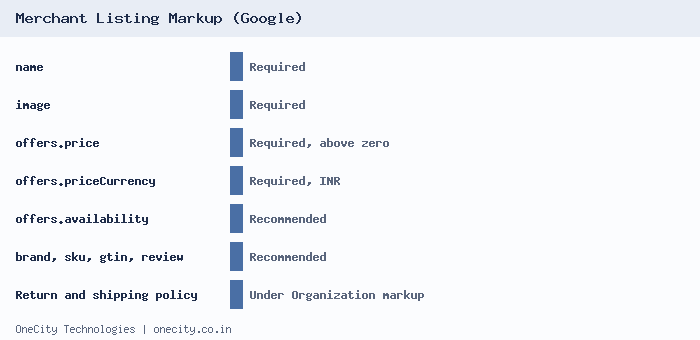
Three details cause most failures. First, a merchant listing needs an Offer, not an AggregateOffer, because the store must be the seller. Second, Google recommends putting return and shipping policies once under Organization markup, and using product-level values only to override them. Third, JavaScript-generated markup is allowed, but Google warns it can make Shopping crawls less frequent and less reliable, so we place Product markup in the first HTML response. Read the full merchant listing documentation.
Our Process for Online Stores
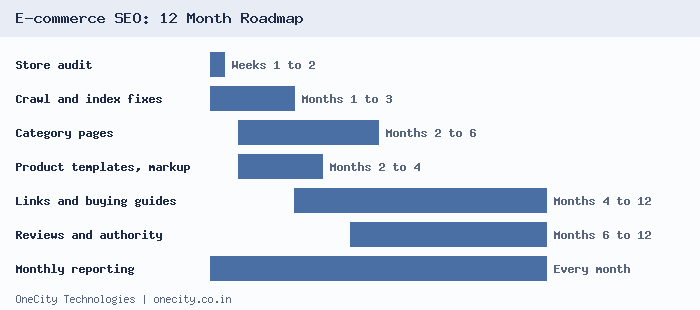
Category pages come before product pages because they carry the broad buyer searches. The timeline below matches what we describe in our e-commerce SEO guide: foundations in months 1 to 3, category pages in months 3 to 6, and the long tail of product pages in months 6 to 12.
Step 1. Store audit
We crawl the store, read Search Console and GA4, test speed on category and product templates, and check markup. You get a ranked fix list, with the pages most likely to earn first.
Step 2. Crawl and index foundation
Filters, pagination, variants, canonicals, sitemaps and empty categories. These fixes show up in the Search Console crawl stats within weeks.
Step 3. Category pages first
We map each category to the phrases buyers search, then rewrite the title, heading and intro. We add a short buying guide, size or spec help, and links to subcategories and best sellers.
Step 4. Product templates and markup
One tested template for every product page: unique copy, image alt text, visible price and stock, review markup and Product schema. We roll it out in batches of your best sellers.
Step 5. Internal links and buying guides
Guides and comparisons answer questions shoppers ask before buying, and link to the matching categories. Our product page guide and e-commerce keyword guide show how we plan this.
Step 6. Reviews and authority
We set up a review collection process, earn links from relevant sites, and for stores with a physical shop, fix the Google Business Profile through our profile management service.
Platforms We Work On
| Platform | What we check first |
|---|---|
| Shopify | Collection, tag and variant URLs that duplicate product pages, theme code for markup, and app scripts that slow templates. |
| WooCommerce | Filter and sort parameters, product tags and attribute archives that create thin pages, hosting speed, and plugin overlap. |
| OpenCart | SEO URL settings and rewrite rules, and the same product reachable through several category paths. |
| Magento | Layered navigation URLs, canonical settings and category template speed. |
| Custom Laravel or PHP | Canonicals, markup and sitemaps built into the templates, and clean URLs for categories and variants. |
We also build stores ourselves, so we can brief your developers with exact changes or make them directly. See our e-commerce website development work.
E-commerce SEO Pricing
These are our monthly SEO plans. Stores usually need the Growth plan or above, because category and product volume adds work even for small catalogues. The quote comes after the audit, and contracts start with three months, then run month to month. See the full SEO pricing guide.
| Plan | Monthly | Usually fits |
|---|---|---|
| Local SEO | ₹15,000 to ₹25,000 | A store with a physical shop and a small catalogue where local search matters most |
| Growth SEO | ₹25,000 to ₹50,000 | An online-first store with several categories and a growing catalogue |
| Enterprise SEO | ₹50,000 to ₹1,50,000 | Large catalogues, many categories, or several markets and languages |
What moves a quote up or down: the number of products and categories, the platform, how many filter URLs exist today, how much content must be written, and if you sell in more than one country.
What Results to Expect
Crawl fixes show in Search Console within weeks. Category pages usually take three to six months to move. Product pages follow over six to twelve months. We cannot promise a position, because rankings also depend on competitors, your prices, stock and delivery times. What we do promise is a monthly report that shows clicks by page type, so you can see which work is paying back.
Who Does the Work
L.K. Monu Borkala founded OneCity Technologies in Bangalore and has worked in SEO for over 20 years. The team works from our Bengaluru office, with branches in Mangaluru and Mysuru. To see how an engagement runs, read what to expect in the first 90 days. For search inside AI answers, see our AI SEO services.
What We Need From You to Start
- Your store URL and the platform it runs on.
- Read access to Google Search Console and GA4.
- A product export in CSV, so we can check titles, descriptions and images at scale.
- Your five best-selling categories and five best-selling products.
- A named person who can approve copy changes, and a developer contact for template changes.
Want an audit of your store? Send us your store link or call 99023 30233, and we will reply with what we find.
Frequently Asked Questions
How much does e-commerce SEO cost in India?
Our monthly plans run ₹15,000 to ₹25,000 for Local SEO, ₹25,000 to ₹50,000 for Growth SEO, and ₹50,000 to ₹1,50,000 for Enterprise SEO. Larger catalogues cost more. We quote after a free store audit, and contracts start with three months.
How long before an online store sees results from SEO?
Crawl fixes appear in Search Console within weeks. Category pages usually take three to six months to move up, and the long tail of product pages takes six to twelve months. We cannot promise exact positions, but we report clicks by page type every month.
Is Shopify or WooCommerce better for SEO?
Both can rank well. Shopify is quicker to launch but gives less control over URL structure. WooCommerce gives more control, but needs good hosting and careful setup. We review your catalogue size and team before advising a move, because a migration carries its own ranking risk.
Do I need Google Merchant Center for e-commerce SEO?
It is not required to rank in normal search results. Google says a Merchant Center feed alongside page markup gives the widest eligibility for shopping features. Free listings need return policy and shipping settings, and we set up both when we connect your feed.
Should filter pages on my store be indexed?
Usually not. We block crawling of filter parameters in robots.txt. The exception is a filter that matches a real search, such as black running shoes for men. That page gets a clean URL, its own title and copy, and a 404 when no products match.
Can you work on a store built by another developer?
Yes. We work on Shopify, WooCommerce, OpenCart, Magento and custom builds. After the audit we either make the changes with your access or give your developer a list of exact fixes with URLs, so nothing is left to interpretation. Large template changes are best done by your own developer.
Can SEO fix a traffic drop after a Google update?
We start in Search Console to see which page types lost clicks and when, and separate site faults from an update effect. Technical faults can be fixed quickly. Quality problems, such as thin category copy or copied product text, take months to improve.
Author: L.K. Monu Borkala, Founder, OneCity Technologies.